Todo KDP Interior Template: Streamlining Daily Planner Creation
The self-publishing landscape has evolved significantly, moving beyond simple text-based novels to include a vast array of low-content and medium-content books. Among these, daily planners remain a perennial bestseller due to their practical utility and consistent demand. However, creating a functional, aesthetically pleasing planner from scratch requires significant design expertise and time. This is where the Todo KDP Interior Template serves as a critical resource for publishers. By providing a pre-structured foundation, this template allows creators to focus on niche selection and marketing rather than the tedious mechanics of page layout.
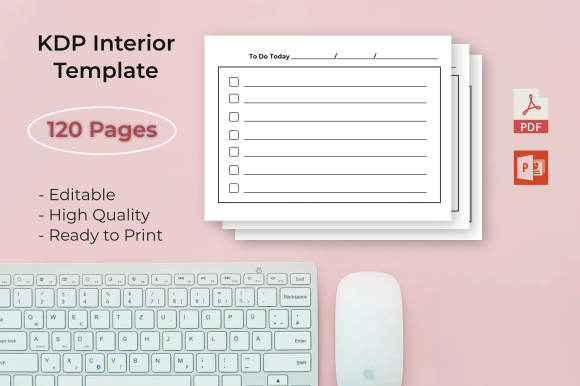
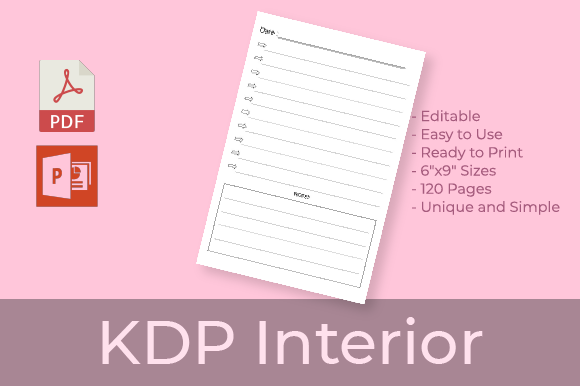
Understanding the technical and creative specifications of this template is essential for anyone looking to produce high-quality stationery products. The "Daily Planner template" available for instant download in both PDF and PowerPoint formats offers a balance of readiness and customizability that appeals to both novice and experienced KDP authors. Below, we explore the practical applications, technical specifications, and strategic considerations for utilizing this 6″ x 9″ interior template effectively.
Technical Specifications and Print Readiness
Success on Amazon KDP relies heavily on adhering to strict printing guidelines. A common pitfall for new publishers is submitting files that are rejected due to margin errors or bleed issues. The Todo KDP Interior Template is engineered specifically to mitigate these risks through precise dimensional formatting.
Dimensions and Page Count
The template utilizes the industry-standard 6″ x 9″ trim size. This dimension is widely considered the sweet spot for daily planners because it offers enough surface area for detailed writing while remaining portable enough to fit in handbags, backpacks, and desk organizers. With 120 pages, this specific configuration provides approximately four months of daily planning space if using one page per day, or a full year if utilizing weekly spreads or condensed layouts. This page count also hits a crucial manufacturing threshold; books with fewer than 100 pages often have limitations on spine text width, whereas 120 pages allows for clear, readable spine typography that enhances shelf visibility.
No Bleed Configuration
A defining characteristic of this template is its No Bleed setting. In printing terms, "bleed" refers to artwork that extends beyond the edge of the page and is trimmed off during production. While bleed allows for edge-to-edge graphics, it significantly increases the complexity of file preparation and the likelihood of rejection if margins are off by even a fraction of an inch.
By utilizing a no-bleed format, the Todo KDP Interior Template ensures that all content sits safely within the printable area. This creates a clean, framed look that is traditional for stationery and reduces the anxiety associated with file approval. For creators who are not professional graphic designers, this specification acts as a safety net, ensuring the final printed product looks professional without requiring advanced prepress knowledge.
Format Versatility: PDF and PPTX Integration
One of the most significant advantages of this specific template package is the dual-format delivery system. Most templates offer only a static PDF, which limits the user's ability to differentiate their product. The inclusion of an editable PowerPoint (PPTX) source file alongside the print-ready PDF changes the workflow entirely.
- Instant Deployment via PDF: For publishers who want to test a niche quickly or lack design software, the high-quality print-ready PDF can be uploaded directly to KDP. This facilitates rapid market validation.
- Customization via PPTX: PowerPoint is a ubiquitous tool that most users already understand. Unlike Adobe InDesign, which has a steep learning curve, PPTX allows users to modify fonts, adjust header text, add motivational quotes, or change color accents using familiar drag-and-drop interfaces.
- Source File Ownership: Having access to the source files means you are not locked into a single design. You can create variations of the same base template to build a cohesive brand series without redesigning the grid structure every time.
This flexibility is particularly valuable for business owners and professionals who may want to create branded planners for corporate gifts or internal team organization. The ability to edit the source file transforms a generic commodity into a tailored organizational tool.
Practical Applications and Target Audiences
The utility of the Todo KDP Interior Template extends far beyond general consumer sales. Understanding who benefits from this tool helps in positioning the final product effectively.
For KDP Publishers and Side Hustlers
For those building a portfolio of low-content books, speed and consistency are paramount. This template eliminates the "blank page syndrome." Instead of spending weeks designing grids and testing margins, publishers can allocate that time to keyword research, cover design, and advertising. The standardized 120-page structure also makes it easier to calculate royalty margins and pricing strategies across multiple titles.
For Coaches and Consultants
Life coaches, fitness trainers, and business consultants often require proprietary tools for their clients. Using the editable PPTX version of the Daily Planner template, these professionals can insert their own methodologies, branding, and specific tracking metrics. Rather than paying a designer thousands of dollars for a custom interior, they can adapt this template to create a value-add product that reinforces their coaching program.
For Educators and Students
Academic planning requires specific structures. While this is a general daily planner, the editable nature allows educators to modify headers to reflect class schedules, assignment trackers, or study goals. The 6x9 size is ideal for students who need to carry their planner between classes without adding bulk to their backpacks.
Evaluating Suitability and Limitations
While the Todo KDP Interior Template offers immense value, it is important to approach it with realistic expectations. Not every project is suited for a pre-made template, and understanding these boundaries prevents frustration.
When to Use This Template
This template is ideal when your primary goal is functionality over artistic novelty. If you are creating a productivity journal, a gratitude diary, a habit tracker, or a standard appointment book, the pre-set margins and grid systems are optimized for readability and usability. It is also the correct choice when you need to scale production; if you plan to release quarterly planners or themed variations, starting with a solid, tested base saves hundreds of hours of labor.
Considerations and Constraints
Potential users should recognize that a no-bleed, 6x9 template imposes certain creative limits. You cannot achieve full-page background illustrations or edge-to-edge patterns. If your brand identity relies heavily on immersive, full-color artwork that bleeds off the page, this specific template will not meet your needs. Additionally, because this is a popular format, differentiation becomes key. Relying solely on the unedited PDF may result in a product that looks identical to others in the marketplace. Users must leverage the PPTX customization features to add unique value propositions, such as specialized prompts, niche-specific terminology, or distinctive typographic choices.
Best Practices for Implementation
To maximize the effectiveness of the Todo KDP Interior Template, consider the following workflow recommendations:
- Validate Before Customizing: Always upload the original PDF to KDP’s previewer first to ensure you understand how the safe zones work. Once confirmed, proceed with editing the PPTX.
- Maintain Margin Integrity: When editing the PowerPoint file, avoid dragging elements too close to the gutter (inner margin). The 6x9 no-bleed format relies on specific white space to remain legible after binding.
- Test Print at Home: Before publishing, print a few pages from your customized PPTX on a standard home printer at "actual size." This physical proof allows you to check if the writing spaces are actually comfortable for handwriting, something that is difficult to judge on a screen.
- Leverage the 120-Page Structure: Design your cover and description to match the interior volume. If the template covers roughly 4 months of daily use, market it as a "Quarterly Planner" or "90-Day Goal Tracker" rather than a generic annual planner to manage customer expectations accurately.
Final Thoughts on Digital Asset Utilization
The Todo KDP Interior Template represents a shift toward efficient, asset-based publishing. By combining technical precision with editable accessibility, it bridges the gap between professional printing standards and consumer-grade design tools. Whether you are a seasoned self-publisher looking to streamline operations or a professional seeking to create bespoke organizational tools, the combination of a print-ready PDF and an editable PPTX source file provides a versatile foundation.
Ultimately, the value of this template lies not just in the pages themselves, but in the time and cognitive load it saves. In a competitive marketplace, the ability to iterate quickly while maintaining professional quality is a distinct advantage. By understanding the specifications—6x9 dimensions, 120 pages, and no-bleed safety—and respecting the intended use cases, creators can transform this digital asset into tangible, useful products that serve real-world needs.