KDP Ready Weekly Planner Interior: Streamlining Your Low-Content Publishing Workflow
Building a sustainable Amazon KDP business requires balancing speed to market with product quality. For publishers focusing on low-content and medium-content books, the interior design phase often becomes the primary bottleneck. Creating consistent, properly formatted layouts from scratch for every new title is inefficient and prone to formatting errors. A KDP Ready Weekly Planner Interior serves as a foundational asset in this workflow, bridging the gap between initial concept and final publication. Rather than viewing this resource as a finished product, successful publishers integrate it as a structural base that accelerates production while maintaining professional standards.
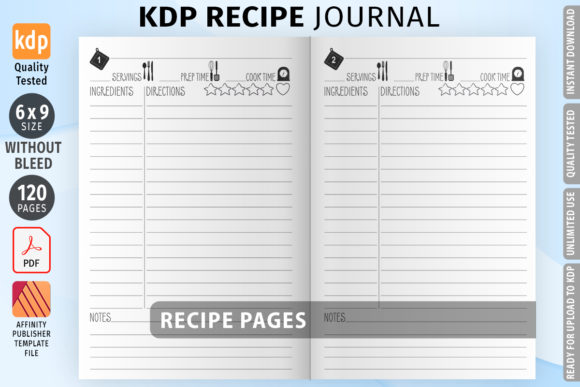
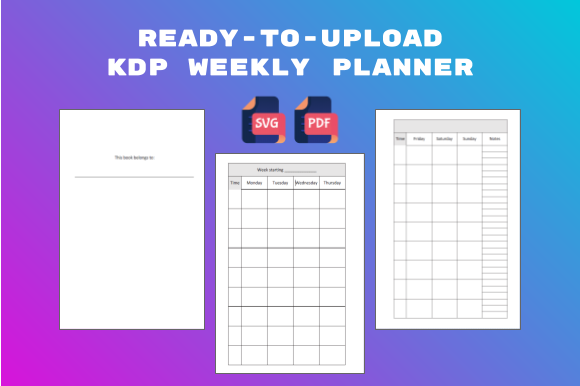
This specific ready-to-upload weekly planner provides a 105-page, 6x9 inch PDF file configured with no bleed settings. It includes pre-set margins and a logical page flow, starting with a "This book belongs to" page followed by two-page weekly spreads. Each spread contains dedicated sections for Monday through Sunday, time slots, and notes. While the basic and plain layout allows for immediate upload, its true value lies in its function as a customizable template. By leveraging the included SVG files, creators can modify fonts, add illustrations, insert inspirational quotes, or create niche-specific fields like homework trackers or project milestones. This flexibility transforms a generic utility into a targeted solution for specific audiences, which is essential for long-term viability in the KDP marketplace.
Integrating the Template into Pre-Production Planning
Before opening any design software, the KDP Ready Weekly Planner Interior should inform your niche research and product differentiation strategy. Because the base structure is already solved, you can shift mental energy toward identifying underserved sub-niches rather than worrying about grid alignment. During the research phase, analyze competitor reviews to identify missing features in existing weekly planners. Does the target audience need more writing space? Do they prefer undated formats? Are they looking for specific prompts?
With the SVG source files available, you can map these insights directly to the template before beginning design work. For example, if researching planners for teachers reveals a high demand for lesson planning space, you can immediately assess how the existing "Notes" section could be repurposed or expanded. This pre-production alignment ensures that when you begin customization, every change serves a strategic purpose. It prevents the common pitfall of making aesthetic changes that do not improve user experience or market fit. The template acts as a constraint that focuses creativity on value-added modifications rather than arbitrary design choices.
Customization Workflows Using SVG Assets
The inclusion of SVG files distinguishes this resource from standard PDF-only interiors. Vector-based assets allow for infinite scaling and precise editing without quality loss, which is critical for print clarity. When integrating this planner into your creative process, establish a systematic approach to modification to maintain consistency across all 105 pages.
- Typography Hierarchy: Replace default fonts with licensed commercial-use typefaces that match your brand identity. Ensure body text remains legible at small sizes and that headers provide clear visual navigation. Test print samples to verify ink density and readability.
- Niche-Specific Field Addition: Use the vector layers to add specialized tracking areas. A fitness planner might include water intake icons; a financial planner could add expense categories. These additions transform the generic weekly spread into a specialized tool.
- Visual Branding Elements: Incorporate subtle illustrations, borders, or motivational quotes that resonate with your target demographic. Keep decorative elements minimal to preserve writing space and reduce printing costs associated with heavy ink coverage.
- Structural Adjustments: Modify the two-page spread layout if your niche requires asymmetric designs. Perhaps the left page needs hourly scheduling while the right page requires open journaling space. The SVG format makes these structural pivots manageable.
Treating the customization phase as a repeatable system rather than a one-off art project enables batch processing. Create master style guides and component libraries within your design software so future planner variations can be produced faster while maintaining cohesive branding.
Technical Validation and Quality Control
Even though the KDP Ready Weekly Planner Interior arrives with margins set and no bleed configuration, rigorous quality control remains essential. Platform specifications change, and personal modifications can inadvertently introduce formatting issues. Before uploading, implement a verification checklist that goes beyond visual inspection.
Download Amazon’s current previewer tool and load your modified PDF to check for margin violations, especially after adding custom elements near page edges. Verify that the two-page spread alignment works correctly in both digital preview and physical proof copies. Misaligned gutters are a common complaint in planner reviews and can destroy credibility. Check that all hyperlinks (if added) function properly and that blank pages are intentionally placed where needed for double-sided printing considerations.
Ordering a physical proof copy is non-negotiable for serious publishers. Digital screens cannot accurately represent paper texture, ink absorption, or binding tightness. Use the proof to test actual usability: write in it with different pens, check if the paper bleeds through, assess whether the binding lays flat enough for comfortable use. This tactile feedback loop often reveals necessary adjustments that digital previews miss. Document these findings to refine future iterations of your planner line.
Strategic Positioning Within a Broader Product Ecosystem
A single planner rarely builds a sustainable income stream. This weekly planner interior functions best as part of an interconnected product ecosystem. Consider how it complements other offerings in your catalog. If you sell monthly planners, ensure the weekly version references the same organizational philosophy. If you offer digital planning stickers or printable inserts, design them to align with this planner’s dimensions and aesthetic.
Cross-promotion opportunities emerge naturally when products share DNA. The "notes" section in this weekly planner could reference a separate gratitude journal or goal-setting workbook you publish. Internal linking through Amazon’s series feature or A+ Content helps customers discover related titles. Additionally, the customization potential allows for seasonal or thematic variations using the same base structure. A back-to-school edition, a new year reset version, and a mid-year review planner can all stem from this single template, maximizing return on your initial learning curve.
For educators, coaches, or consultants, this planner can serve as a lead magnet or client resource. Customizing it with your branding and methodology creates tangible value beyond digital content. It becomes a physical touchpoint that reinforces your expertise and keeps your framework top-of-mind throughout the week. This B2B or service-integration use case extends the asset’s utility far beyond direct KDP sales.
Long-Term Asset Management and Iteration
Sustainable publishing treats templates as living assets rather than disposable files. Maintain organized version control for your KDP Ready Weekly Planner Interior modifications. Keep original unedited SVGs separate from customized versions. Document font licenses, color codes, and layout decisions in a central reference file. This organization prevents future legal issues and speeds up updates when Amazon changes specifications or when market preferences shift.
Schedule quarterly reviews of your planner’s performance metrics. Analyze customer feedback, return rates, and sales trends to identify improvement opportunities. Perhaps users consistently mention wanting more weekend space or different time slot increments. Feed these insights back into your next revision cycle. The ability to quickly update and republish improved versions gives you a competitive advantage over publishers who must rebuild interiors from scratch.
Remember that this resource excludes a front cover. Cover design should be treated as a separate but coordinated workflow. Your cover must accurately represent the interior’s layout and value proposition. Use interior screenshots in your listing images and A+ Content to set accurate expectations. Transparency about what customers receive reduces negative reviews and builds trust. The synergy between a professionally designed cover and a thoughtfully customized interior creates the complete package that converts browsers into buyers.
Ultimately, this KDP Ready Weekly Planner Interior is a productivity tool for publishers themselves. It removes technical friction, enforces consistent quality standards, and frees creative capacity for market-responsive innovation. By approaching it as a strategic component of your publishing infrastructure rather than a shortcut, you build a foundation capable of supporting sustained growth and audience satisfaction in the competitive low-content book market.