Monthly Schedule KDP Interior Editable Guide
Creating a successful low-content book on Amazon requires more than just a catchy cover; the interior experience determines whether a customer leaves a five-star review or returns the product. A Monthly Schedule KDP Interior Editable template bridges the gap between professional publishing standards and accessible design tools for creators at any skill level. Instead of wrestling with complex graphic design software or paying expensive freelancers for every new title, this resource provides a streamlined pathway to publishing high-quality planners. The core value lies in its flexibility, allowing you to customize layouts while ensuring technical compliance with Amazon’s strict printing guidelines.
What Makes This Resource Essential for Publishers
At its heart, this editable interior is designed to remove technical friction from the publishing process. Many aspiring authors struggle with margin errors, bleed settings, and resolution issues that lead to rejected uploads or poor print quality. This specific package addresses those pain points directly by providing files that have already been tested on KDP. When you utilize a pre-validated template, you are essentially fast-tracking your quality assurance phase. The inclusion of an editable source file in PowerPoint format is particularly significant because it democratizes the design process. You do not need to learn Adobe InDesign or Affinity Publisher to make meaningful changes. Most entrepreneurs and educators already possess basic PowerPoint skills, making the learning curve virtually non-existent.
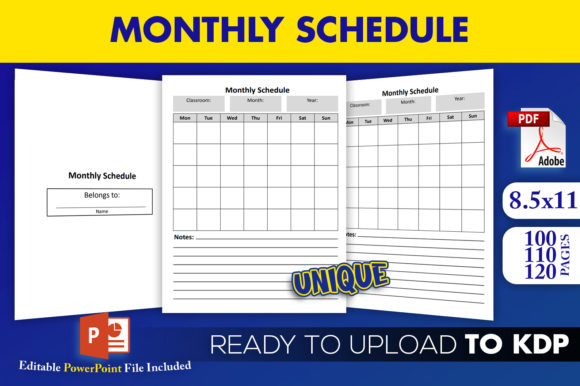
The versatility of the 8.5×11 trim size cannot be overstated. This dimension is the industry standard for monthly planners, academic calendars, and business organizers. It offers ample whitespace for users to write comfortably, which is a critical factor in customer satisfaction for stationery products. By starting with this optimized canvas size, you ensure your final product feels substantial and professional in the hands of the end user.
Understanding Your Download Package
When you acquire this Monthly Schedule KDP Interior Editable asset, you receive a comprehensive suite of files designed for immediate action. Understanding exactly what is included helps you plan your workflow efficiently:
- Edit Source File (PPTX): This is your master workspace. Unlike static PDFs, this PowerPoint file allows you to adjust fonts, move grid lines, add branding elements, or modify headers. It serves as the foundation for creating unique variations without starting from scratch.
- Three Ready-to-Upload PDFs: Convenience is key for publishers managing multiple titles. The package includes three distinct PDF interiors with page counts of 100, 110, and 120 pages. These are pre-formatted and tested, meaning you can upload them directly if you choose not to make edits.
- High-Resolution Graphics: Blurry lines or pixelated text are the fastest way to garner negative reviews. All interiors are rendered in high resolution to ensure crisp printing on both white and cream paper stock.
- Tested Compliance: Perhaps the most valuable feature is the assurance that these files have been tested on KDP. This significantly reduces the anxiety associated with the publishing dashboard and prevents costly proofing delays.
Practical Applications Across Different Niches
The true power of an editable monthly schedule lies in its adaptability. While the base structure remains consistent, the application varies wildly depending on your target audience. For educators, the 110-page version might serve as an academic lesson planner spanning a full school year. Teachers often need specific sections for grading, attendance, or parent communication, all of which can be added using the PPTX source file. The ability to tweak the interior means you can create niche-specific tools rather than generic calendars that fail to address real user needs.
Small business owners and freelancers represent another vital demographic. They often require undated monthly schedules that allow for flexible project management rather than rigid calendar dates. Using the editable PowerPoint file, you can rebrand the interior with corporate colors, add logo placements, or include specific tracking tables for invoices and client meetings. This transforms a simple schedule into a specialized business tool. Similarly, wellness coaches and fitness trainers can repurpose the 100-page layout into habit trackers or meal prep journals by simply adjusting the header text and adding relevant icons.
For digital marketers and content creators, this resource supports the creation of lead magnets or bonus content. A high-resolution, professionally formatted monthly schedule adds perceived value to email opt-ins or course bundles. Because the files are editable, you can maintain brand consistency across your physical KDP books and digital downloads, reinforcing your authority and visual identity.
Customization Strategies for Beginners
If you are new to KDP publishing, the prospect of editing an interior might feel daunting. However, the PowerPoint format makes this approachable. Start with small, high-impact changes before attempting a complete redesign. Changing the font family to something distinctive yet readable can instantly differentiate your book from competitors using default templates. Adding a motivational quote to the bottom of each monthly spread takes only minutes but adds a layer of personality that customers appreciate.
Consider utilizing the different page count options strategically. The 100-page version is excellent for quarterly planners or specialized short-term projects, keeping production costs lower and retail prices competitive. The 120-page option works best for comprehensive annual planners where durability and longevity justify a higher price point. Having all three options available allows you to test market demand without additional design investment. You might launch with the 110-page version as your flagship product, then expand to the other sizes based on customer feedback and sales data.
Critical Considerations Before Publishing
While this Monthly Schedule KDP Interior Editable template solves many technical challenges, success still requires thoughtful execution. Always order a physical proof copy before launching, even when using tested files. Screen calibration differs from print output, and seeing the actual trim size and paper texture is irreplaceable for quality control. Verify that your customized PPTX exports maintain the correct margins and bleed settings. Sometimes, moving elements during editing can inadvertently shift content outside the safe zone. Double-checking these parameters saves time and prevents customer disappointment.
Also, consider the competitive landscape. Since editable templates are accessible to many publishers, differentiation is essential. Use the source file to add unique value propositions that others cannot easily replicate. This could include specialized reference pages, unique organizational systems, or proprietary content integrated into the monthly spreads. The template provides the structural integrity, but your creative input provides the market appeal.
Finally, remember that file compatibility matters. Ensure your version of PowerPoint supports all features used in the source file to prevent formatting shifts. If you encounter issues, stick to the pre-made PDFs while troubleshooting. The goal is to build a sustainable publishing business, and leveraging tested, high-resolution assets is a smart strategy for maintaining momentum and quality standards in the crowded low-content book market.